

Onsite Use Cases
Grow your O&O with video placed and ranked for every viewer.
Social Experience Placements
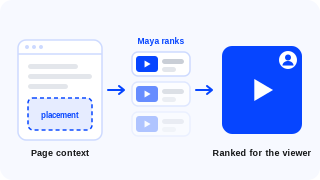 Start here
See how Onsite picks video for every page and every viewer
A placement renders a player on your page, and Maya chooses its videos from the page’s context and what the viewer watched before.
Read now Player Styles
Compare the four player styles
Compare Vertical, Horizontal, Audio + Video, and Keywords players and pick the one that fits each page.
Read now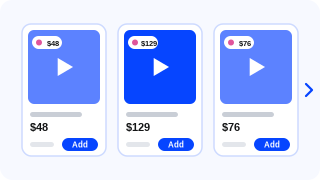 Shoppable Carousel
Sell straight from video on product and category pages
Each video carries products with price, availability, and a buy or add-to-cart action wired to your commerce API through the SDK.
Read now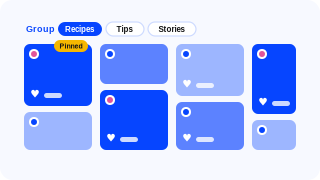 Content Hub
Bring creator and member posts into your own pages
A wall of posts organized by group, with reactions, replies, and pinned posts, rendered inside your pages.
Read now Live & Q&AComing soon
Host live sessions with questions, polls, and replay
A scheduled live player hosted by a creator. Sessions become Shorts clips automatically.
Read now Sticky Mini-Player
Keep video playing while visitors scroll and browse
A small player docks to a corner and keeps playing as the viewer scrolls or moves between pages, preserving the session.
Read nowLanding Pages
 Subdomain Landing Page
Put your hosted social experience on your own subdomain
Your hosted social experience on your Genuin subdomain or on a subdomain of your own domain, such as video.yourbrand.com.
Read now Generative Destination
Launch a brand-owned video destination on your own domain
A destination such as video.yourbrand.com that Studio and Canvas generate and keep fresh, and that partners can allowlist as a verified domain.
Read nowPersonalization
 Personalize User Experience
Make every visit read as one story
What a viewer watched on one page shapes the next placement they see, from home page to category to product.
Read now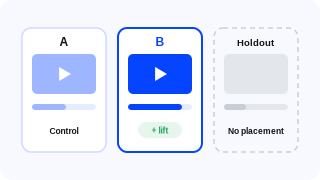 Experiments and Holdouts
Prove the lift of every placement change
Built-in A/B tests and standing holdouts per placement, so each layout or setting change is read as lift, not as a trend.
Read now

