

How can brands organize, manage, and grow communities in Brand Control Center?
Community-driven experiences help brands increase engagement, retention, and user participation across their owned digital properties.
With the Genuin SDK, brands can integrate community experiences directly into their websites and mobile apps without building complex infrastructure from scratch.
This allows brands to:
- Create interactive Community Media Networks
- Build topic-based communities and groups
- Enable creator and member participation
- Drive user-generated content
- Personalize content experiences
- Increase retention and repeat visits
- Scale engagement across web and mobile destinations
The SDK combines community management, content engagement, AI-powered recommendations, and creator participation into a unified experience.
What can brands build using the Genuin SDK?
Using the SDK, brands can create:
- Community feeds
- Topic-based groups
- Vertical video experiences
- Creator-led communities
- Discussion-driven spaces
- Challenges and quests
- Community onboarding experiences
- Interactive engagement journeys
- Embedded content walls and carousels
These experiences can be integrated into:
- Websites
- Mobile applications
- Ecommerce platforms
- Event experiences
- Membership platforms
- Brand-owned apps
How brands build communities using the SDK
Step 1: Set up the SDK integration
Start by integrating the Genuin SDK into your web or mobile application.
The SDK supports:
- Web
- Android
- iOS
- Flutter
- React Native
During setup, brands configure:
- API keys
- Authentication
- White-labelled domains
- Deep linking
- Push notification support
- User identity and SSO
Once integrated, community experiences can be embedded directly into the application interface.
Step 2: Create communities in Brand Control Center
Communities are managed centrally through the Brand Control Center.
Navigate to: BCC > Manage > Community
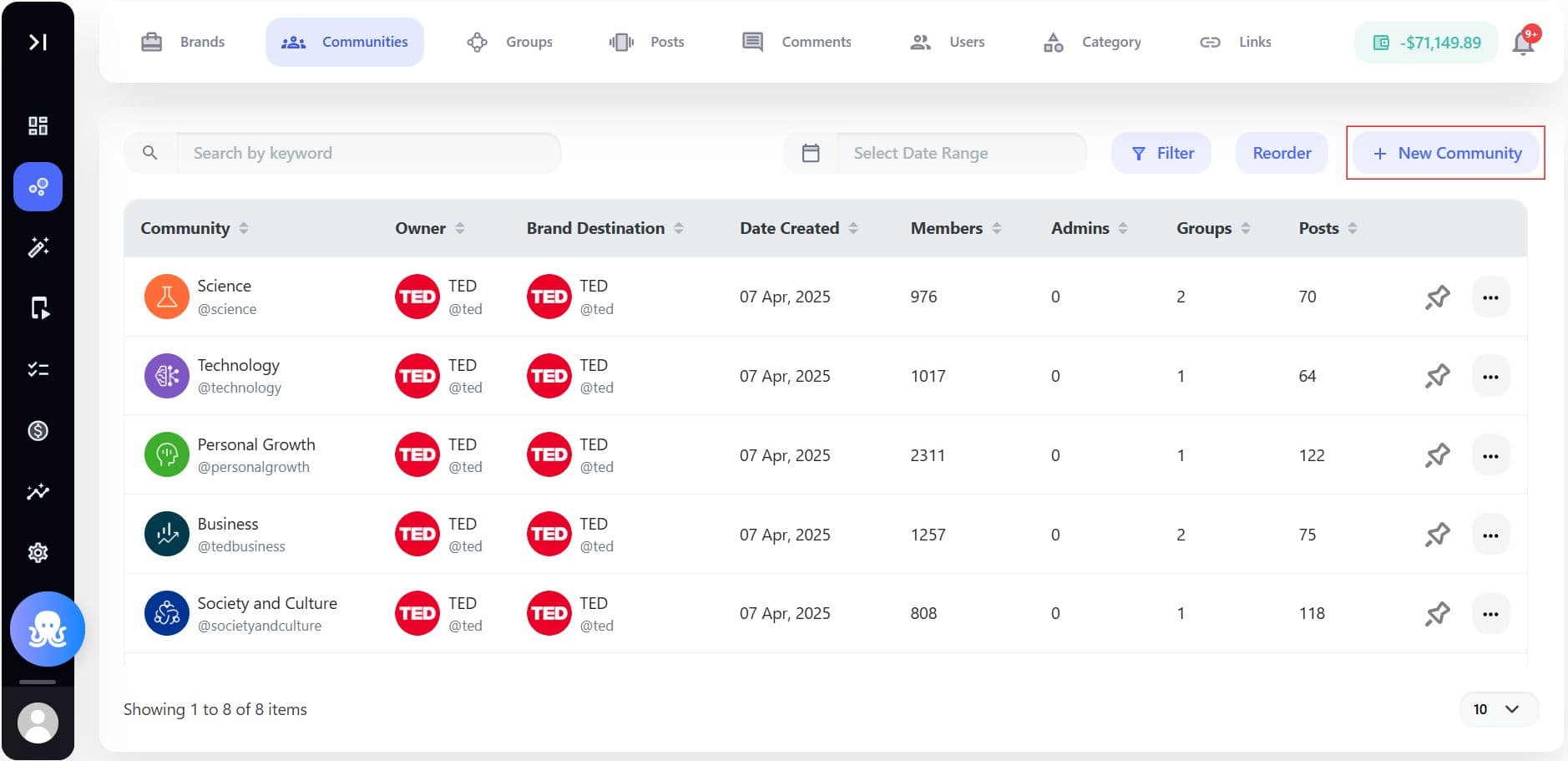
Brands can:
- Create communities
- Organize groups by category or interest
- Configure visibility and moderation settings
- Define community structure
- Assign admins and moderators
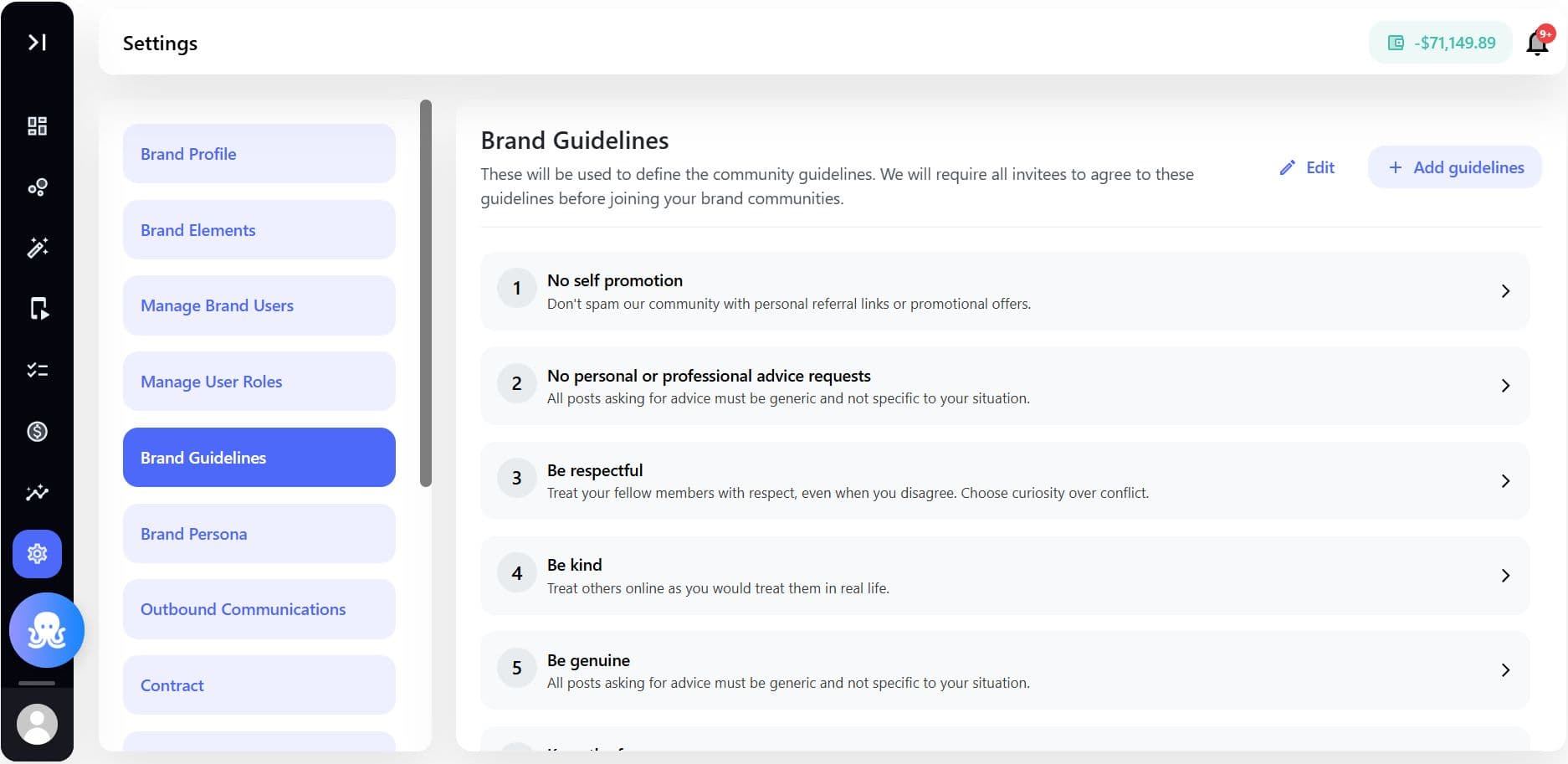
- Configure brand guidelines and governance
Communities can be designed around:
- Products
- Topics
- Interests
- Creator ecosystems
- Events
- Customer segments
- Brand campaigns
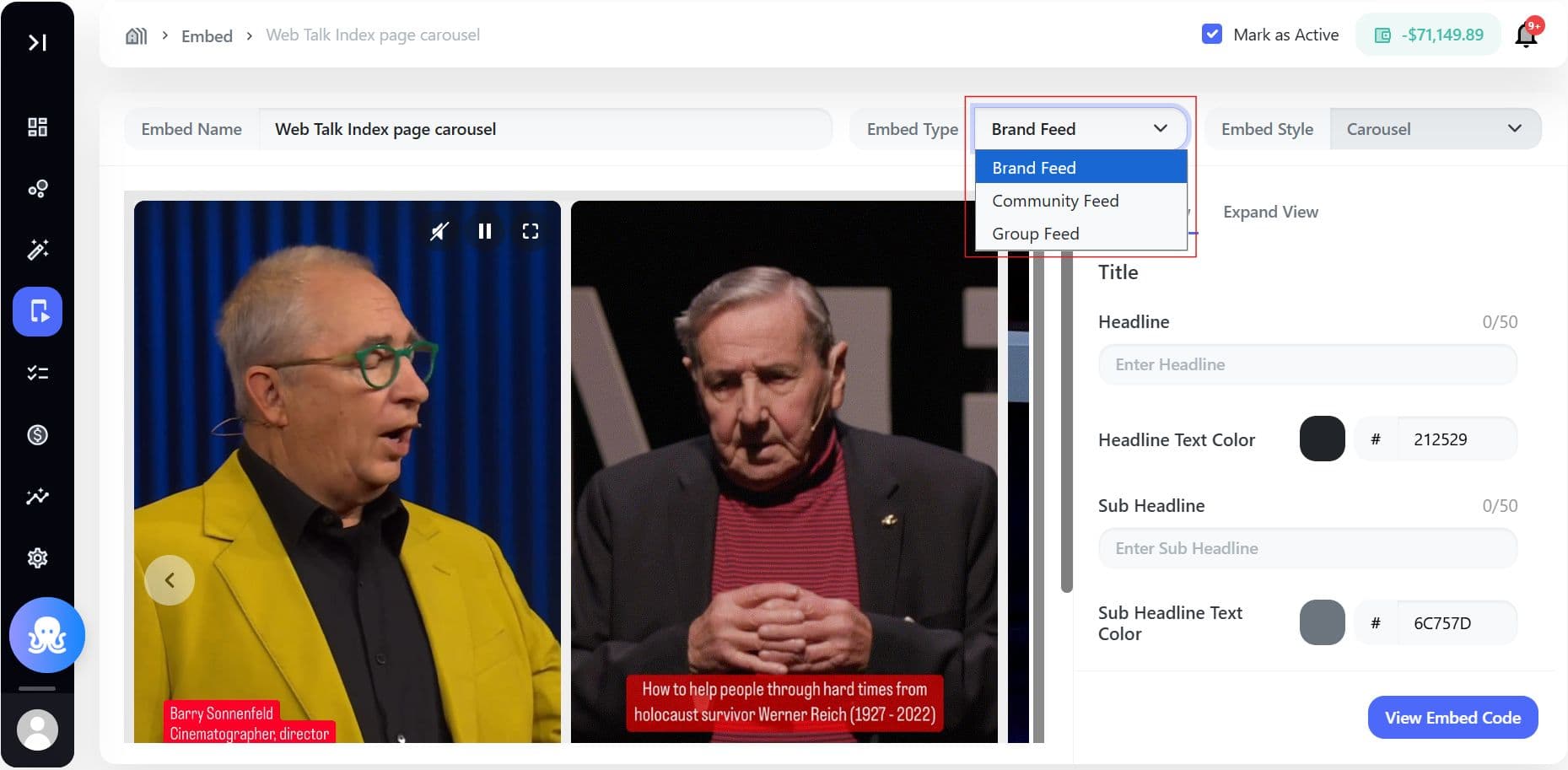
Step 3: Configure feeds, embeds, and community layouts
The SDK supports multiple display experiences for community engagement.
Brands can configure:
Feed Experiences
- Full-screen feeds
- Infinite scrolling video feeds
- Standard wall layouts
Embed Experiences
- Carousel embeds
- Embedded content widgets
- Interactive video placements
Community Navigation
- Group discovery
- Personalized recommendations
- Trending communities
- Search and filtering
These layouts can be customized to match the brand’s design system and user experience goals.
Step 4: Enable creators and member participation
Communities become more valuable when users actively participate.
Brands can enable:
- Creator publishing workflows
- User-generated content
- Group discussions
- Community comments
- Sparks and reactions
- Polls and prompts
- Challenges and quests
Creators and members can contribute directly through SDK-powered experiences while moderation workflows help maintain brand safety.
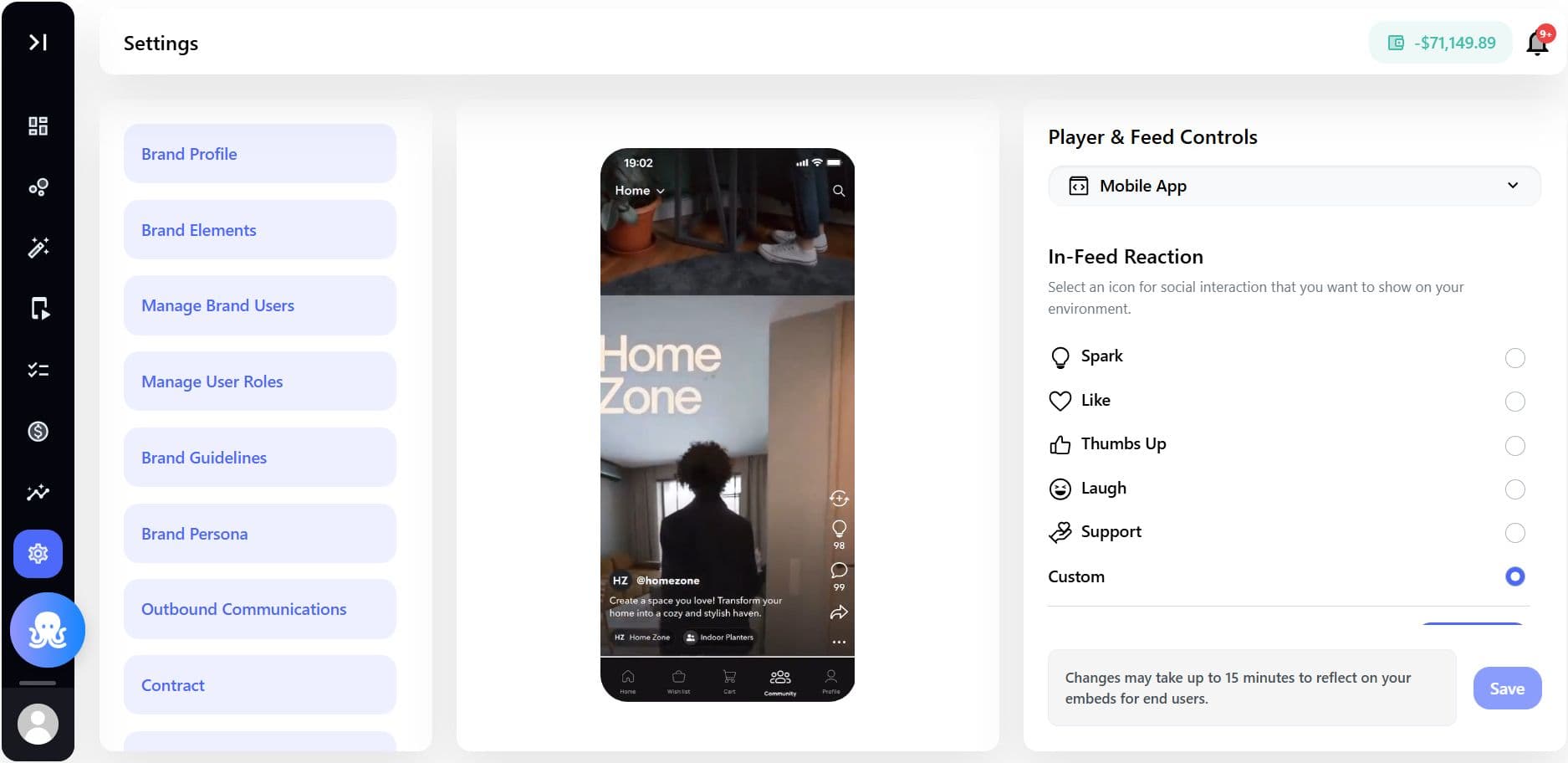
Step 5: Personalize the community experience
The SDK uses engagement signals and user interests to personalize content discovery.
Personalization may include:
- Recommended communities
- Suggested groups
- Personalized feeds
- Interest-based content ranking
- Creator recommendations
- Trending discussions
These recommendations are powered by:
- User interests
- Viewing behavior
- Engagement history
- Group participation
- Community interactions
Personalization improves engagement and helps users discover relevant content faster.
Step 6: Manage moderation and governance
Brands maintain control over community quality through governance workflows.
Available controls may include:
- AI-powered moderation
- Community guidelines enforcement
- Content approval workflows
- User reporting tools
- Admin and moderator permissions
- Group access controls
This helps brands scale communities safely while maintaining consistent user experiences.
Community analytics and reporting
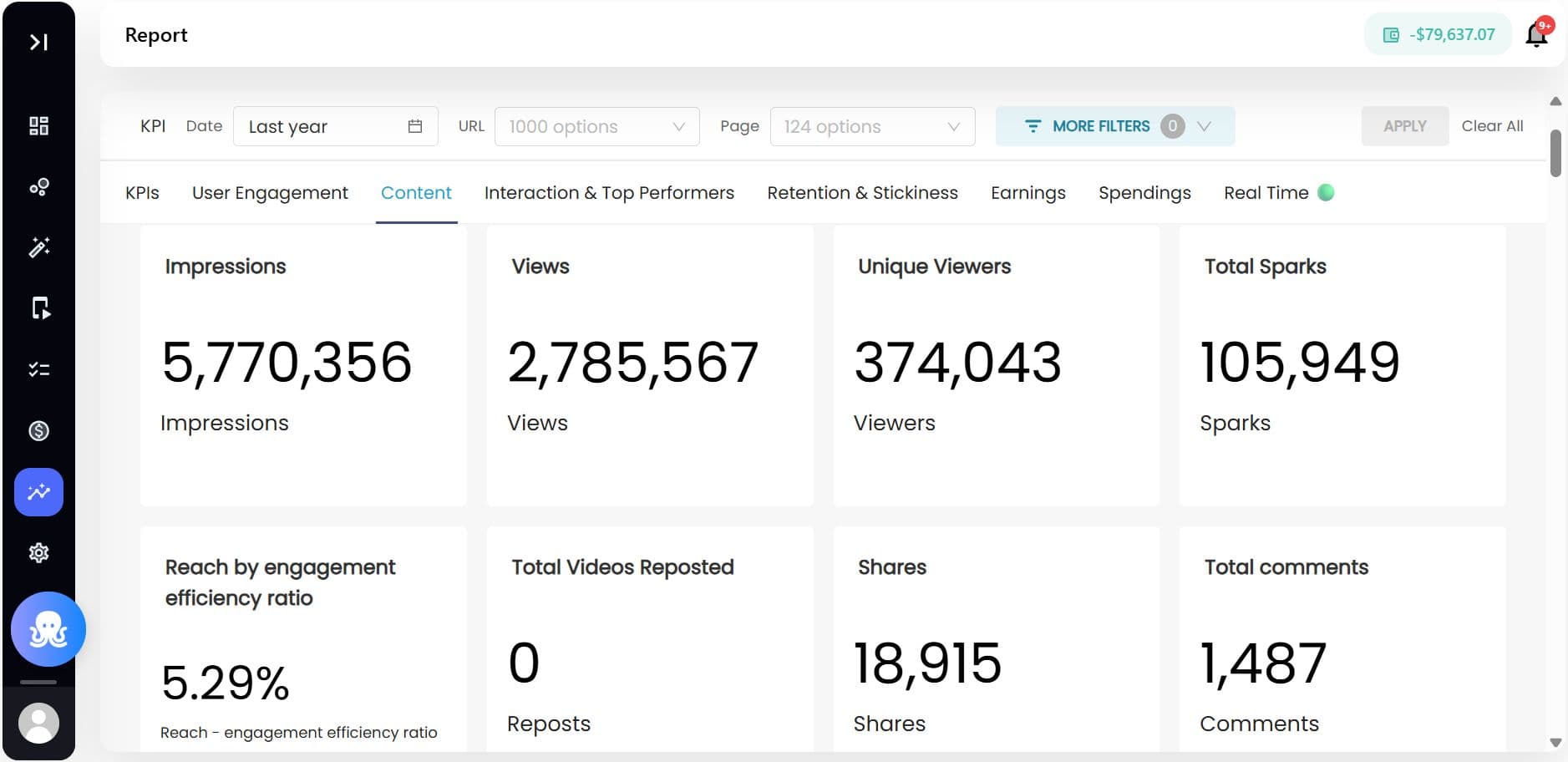
Brands can monitor community performance through Brand Control Center reporting.
Available insights may include:
- Community growth trends
- Engagement metrics
- Video views and completion rates
- Group participation
- Member activity
- Creator performance
- Retention and repeat visits
- Shares and interactions
These insights help optimize content strategy, community structure, and engagement initiatives.
Example use cases
| Use Case | Outcome |
|---|---|
| Brand Fan Communities | Build loyal member ecosystems |
| Ecommerce Communities | Drive product engagement and retention |
| Fitness or Wellness Groups | Enable recurring participation and challenges |
| Gaming Communities | Increase discussions and creator activity |
| Educational Communities | Organize learning-based engagement |
| Creator Programs | Support creator-led community growth |
| Event Experiences | Build live and post-event engagement hubs |
SDK-powered community features
| Feature | Purpose |
|---|---|
| Feed View | Display personalized community content |
| Carousel Embed | Surface featured or curated content |
| Community Groups | Organize users around interests or topics |
| Deep Linking | Redirect users into specific community experiences |
| Push Notifications | Re-engage users with community activity |
| SSO Support | Provide seamless user authentication |
| AI Recommendations | Personalize discovery and engagement |
| Moderation Tools | Maintain brand safety and governance |
Specs & Limitations
| Area | Details |
|---|---|
| Supported Platforms | Web, Android, iOS, Flutter, React Native |
| Community Management | Controlled through Brand Control Center |
| Authentication | Supports SSO and user identity integrations |
| Deep Linking | Requires white-labelled domain setup |
| Push Notifications | Requires Firebase/APNS configuration |
| AI Moderation | Depends on moderation configuration |
| Reporting Availability | Based on enabled analytics modules |
| Community Access | Can be public or restricted |
Best practices
- Define clear community goals before launch
- Organize communities around meaningful interests
- Combine creator content with user participation
- Enable onboarding flows for new members
- Use AI recommendations to improve discovery
- Regularly monitor engagement analytics
- Establish moderation and governance policies early
- Reward active contributors and advocates
Related articles
- How can creators build their communities using Genuin Studio App across brand destinations?
- How can creators grow their community using Genuin Studio across brands they love?
- iOS SDK 2.0 - How to Integrate and Power Your Brand Community in iOS Apps
- How do you embed and configure the Genuin Web SDK on your website?
- How to integrate Genuin SDK with Android Apps: Step by Step Guide
