

How Do I Set Up Brand Guidelines?
Brand guidelines help maintain consistency, quality, safety, and trust across your Community Media Network. They define how content should look, sound, and behave across communities, groups, creator collaborations, campaigns, and user-generated content experiences.
Inside the Brand Control Center, brand guidelines act as a governance framework that helps brands:
- Maintain a consistent brand identity
- Align creators and moderators with brand standards
- Improve AI-assisted content moderation and curation
- Reduce off-brand or unsafe content
- Standardize campaigns across communities and regions
- Protect sponsorship and advertiser relationships
- Create scalable community operations
Guidelines can be applied across:
- Communities
- Groups
- Content submissions
- Creator programs
- Sponsored campaigns
- User-generated content initiatives
- AI moderation workflows
What Can Be Configured in Brand Guidelines?
Brands can define rules and standards related to:
| Guideline Area | Purpose |
|---|---|
| Brand Voice | Tone and communication style |
| Visual Standards | Logos, colors, overlays, thumbnails |
| Content Rules | Allowed and restricted content |
| Community Behavior | Engagement and participation expectations |
| Moderation Policies | Review and approval standards |
| Sponsorship Standards | Branded content requirements |
| Creator Requirements | Publishing and collaboration guidelines |
| Compliance Rules | Legal, privacy, and platform policies |
These guidelines ensure all contributors and systems operate within approved brand standards.
How to Set Up Brand Guidelines
Step 1: Login to Brand Control Center
Access the Brand Control Center using your administrator credentials.
Step 2: Navigate to Brand Guidelines
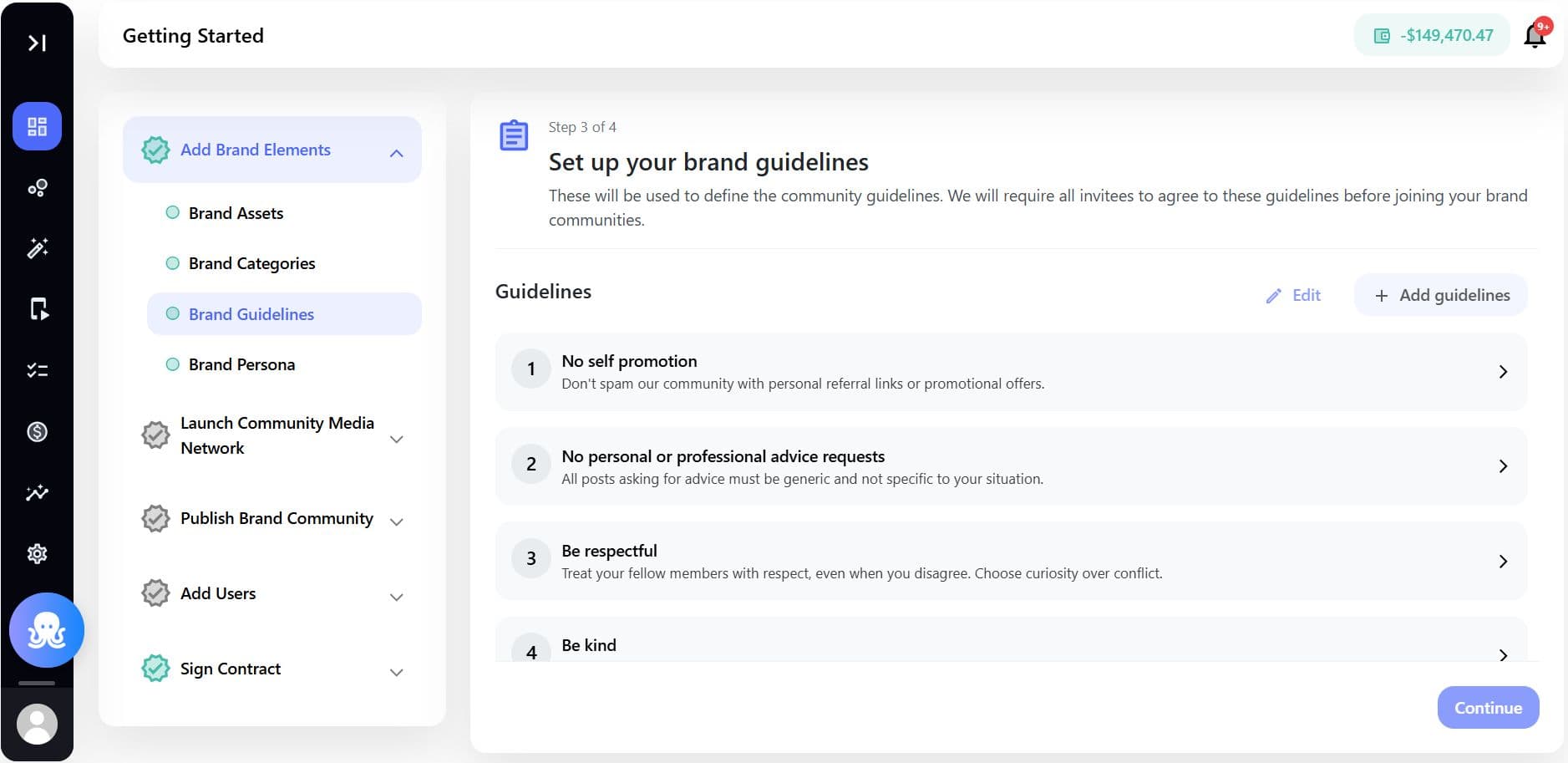
Go to: Build > Brand Elements > Guidelines
This section allows brands to create and manage operational and content governance standards.
Step 3: Create a New Guideline Framework
Click + Add Guidelines.
You can configure multiple guideline sections depending on your operational requirements.
Configure Brand Voice Guidelines
Brand voice guidelines help standardize communication across posts, captions, comments, campaigns, and creator content.
Recommended Areas to Define
| Area | Example |
|---|---|
| Tone | Professional, casual, inspirational |
| Language Style | Short-form, conversational, educational |
| Allowed Messaging | Positive community-first communication |
| Restricted Messaging | Offensive, misleading, or aggressive language |
Example
| Brand Voice Type | Guideline |
|---|---|
| Fitness Brand | Motivational and supportive |
| Technology Brand | Educational and innovation-focused |
| Luxury Brand | Premium and aspirational |
These standards help maintain consistent communication across all member interactions.
Configure Visual Guidelines
Visual guidelines help maintain a consistent presentation style across videos, posts, embeds, and campaigns.
Configurable Elements
| Element | Purpose |
|---|---|
| Logos | Approved logo usage |
| Brand Colors | Consistent visual identity |
| Thumbnail Standards | Uniform content presentation |
| Video Overlay Rules | Sponsored or branded overlays |
| Watermark Usage | Brand visibility and ownership |
| Typography | Approved font usage |
Configure Content Guidelines
Content guidelines define what types of content are encouraged, restricted, or prohibited within the network.
Common Configuration Areas
| Content Type | Example |
|---|---|
| Allowed Content | Tutorials, creator content, educational videos |
| Restricted Content | Explicit language, harmful misinformation |
| Sponsored Content Rules | Disclosure and transparency requirements |
| Community Safety Rules | Harassment and abuse prevention |
These rules can support both manual moderation and AI-assisted review workflows.
Configure Community Participation Guidelines
Community participation standards help maintain healthy engagement environments.
Areas to Define
| Area | Purpose |
|---|---|
| Member Conduct | Respectful participation expectations |
| Comment Policies | Moderation standards |
| Group Rules | Topic-specific participation rules |
| Spam Prevention | Restrictions on repetitive promotions |
| Referral Behavior | Responsible member invitations |
Configure Creator and Contributor Guidelines
Brands working with creators or ambassadors can define publishing standards and collaboration requirements.
Example Creator Rules
- Use approved hashtags
- Follow sponsorship disclosure policies
- Maintain minimum content quality standards
- Avoid competitor promotion conflicts
- Adhere to campaign timelines
This helps streamline creator operations across large-scale community programs.
How Brand Guidelines Support AI Governance
Brand guidelines also improve AI-driven moderation and curation workflows.
The platform can use guideline structures to:
- Flag unsafe content
- Improve recommendation quality
- Detect off-brand messaging
- Assist moderation teams
- Improve content classification accuracy
- Support scalable governance workflows
This creates safer and more trusted community experiences.
Applying Guidelines Across Communities and Groups
Guidelines can be applied across:
| Area | Usage |
|---|---|
| Communities | Community-wide governance |
| Groups | Topic-specific participation standards |
| Campaigns | Sponsored campaign requirements |
| Creator Programs | Publishing expectations |
| User-Generated Content | Submission and moderation rules |
Different communities can also maintain customized guideline variations when needed.
Updating and Managing Guidelines
Brand guidelines should evolve alongside community growth and engagement trends.
Brands should regularly review:
- Moderation reports
- User feedback
- Engagement patterns
- Content performance
- Campaign outcomes
- Safety incidents
Updating guidelines based on real community behavior helps maintain relevance and effectiveness.
Best Practices
Keep Guidelines Clear and Actionable
Avoid vague instructions.
Better Example
- “Sponsored posts must include disclosure labels”
Avoid
- “Be transparent when possible”
Balance Governance with Community Freedom
Overly restrictive guidelines may reduce participation.
Create standards that protect the brand while encouraging authentic engagement.
Align Guidelines with Community Objectives
Different communities may require different operational standards.
Example:
| Community Type | Guideline Focus |
|---|---|
| Creator Network | Content quality and sponsorship compliance |
| Support Community | Respectful communication and problem-solving |
| Fan Community | Positive engagement and participation |
Regularly Train Moderators and Creators
Ensure moderators, admins, and creators understand guideline expectations to maintain operational consistency.
Example Use Cases
Retail Brands
Maintain consistent product storytelling and influencer collaborations.
Media Networks
Standardize editorial and moderation policies across multiple communities.
Sports Communities
Protect community safety during live discussions and events.
Education Platforms
Ensure educational accuracy and respectful peer participation.
Creator-Led Campaigns
Maintain sponsorship compliance and campaign consistency across creators.
Specs & Limitations
| Area | Details |
|---|---|
| Multi-Community Support | Guidelines can apply across multiple communities |
| AI Moderation Support | AI assistance depends on configured rules and signals |
| Customization | Different communities can maintain unique guidelines |
| Governance Controls | Admin-managed configuration |
| Creator Alignment | Supports creator and ambassador programs |
| Content Enforcement | May require manual moderation workflows |
| Reporting Integration | Moderation and engagement insights available in reports |
| Real-Time Updates | Guideline updates apply to future workflows |
